Tag Archives: Kinetic Chain

Why Your IT Band Won’t Stop Hurting (The TFL Connection)

Stop Rolling Your IT Band! Why the TFL is the Real Culprit

In my years of clinical practice, I have seen hundreds of patients “torturing” themselves on foam rollers, trying to loosen a tight IT Band. If you’ve done this, you know the cycle: it’s incredibly painful, and the relief lasts for about ten minutes before the tension returns.

Here is the clinical secret: You cannot “stretch” or “roll out” the IT Band. The Iliotibial (IT) Band is not a muscle; it’s a thick, fibrous piece of fascia with the tensile strength of soft tissue steel. If you want it to relax, you have to look at the “engine” that controls its tension. You have to look at the Tensor Fasciae Latae (TFL).

The TFL: The Tiny Muscle with a Big Ego

The TFL is a small, teardrop-shaped muscle located on the high-lateral side of your hip, attaching to the ASIS (the bony point at the front of your hip). Its primary job is to assist in hip flexion and rotation.

However, because we live in a “sitting culture,” the TFL is almost always in a shortened, hyper-tonic state. Because it is physically fused to the top of the IT Band, a tight TFL acts like a winch on a Jeep—it cranks the IT Band tight, pulling it across the lateral epicondyle of the knee. That “snapping” or “burning” you feel at your knee? That’s just the symptom. The TFL is the cause.

The “Pocket Muscle” Landmark: How to Find Your TFL Target

To fix the issue, you have to find the right target. Most people look too low on the leg. To find your TFL, put your hands in your front pockets. Where your thumbs naturally rest against the side of your hip—just below that bony “shelf” of your pelvis—that is your TFL.

Still Can’t Find Your Tensor Fasciae Latae?

Sitting in your chair, lift your bent leg slightly up toward the desk. You will feel a piece of muscle pop up on the top of your hip bone. Your TFL is just outside of that muscle that popped up.

The TFL muscle portion attaches along the side-front dip part of your hip bone and goes about 2 inches deep. The TFL muscle then goes down at an angle back to about the top of your leg bone (femur). The muscle then turns to tendon and becomes the Iliotibial band. While the band itself can get stuck and hold trigger points, most times the trigger points are in the TFL muscle itself, which sends referral pain down your IT band.

If you’ve been sitting at a computer all day, pressing into this spot will likely feel like pressing into a bruised golf ball. This is the spot that needs release, not the side of your leg.

The Comfort Trap: Why the TFL Locks Up

This is where my previous articles on Sitting on a Wallet and Sitting on One Leg come into play. When your pelvis is tilted, the TFL on one side is forced into a permanent “crunch.”

Furthermore, the TFL and the Gluteus Medius are supposed to work together to stabilize your hip. However, because our glutes tend to “go to sleep” when we sit, the tiny TFL has to do all the heavy lifting of balancing the weight of your leg. It becomes hyper-tonic (overactive) while the glute medius becomes inhibited. You can’t fix your IT band related knee pain until you level your pelvis and release the TFL engine.

How to Release the TFL: Ischemic Compression

To get a real clinical result at home, don’t just roll back and forth. That just irritates the fascia. Instead, follow these steps:

  • Find the “hot spot” (the pocket muscle) using your lacrosse ball.
  • Lean your weight into it until you feel a “good hurt” (about a 7/10 on the pain scale).
  • Breathe. Hold for 30–60 seconds until you feel the muscle “pulse” or melt.

This is called Ischemic Compression. Ischemic Compression is one way professionals reset a muscle’s resting length and finally allow the IT Band to go slack. While the lacrosse ball is a great way it may not be feasible at the office. In that case pick up a big fat sharpie like this one on Amazon and use it to hold pressure on the tender spot of your TFL. When the tenderness subsides you can use the TheraGun on low to pump in fresh blood.

If you’ve been rolling your leg for months with no relief, it’s time to stop attacking the rope and start addressing the TFL. Your knees—and your lower back—will thank you.


Sitting On One Leg Causes Low Back Pain

Sitting on One Leg: The Hidden Habit Destroying Your Pelvic Alignment

Sitting on one leg is another very common cause of low back pain. Especially in women. Folding a leg between your thigh and the chair seat also causes the same pelvic deviation as mentioned above. At first you may think sitting this way is more comfortable for you. However with the increased number of hours people are sitting at the computer the deviation created is very dangerous. Even if you switch between the left and the right leg.
The compression you are putting on your discs is multiplied far beyond normal. Then you “Switch” and amplify the compression to the opposite side. When you sit at the computer be sure to keep your feet flat on the floor. Better yet take a look at a footrest. There are multiple designs to choose from. I would recommend one that moves easily so you will be inclined to move your legs throughout your workday.


In my time of clinical practice, I’ve noticed a specific pattern of hip tension that almost exclusively affects people who ‘tuck a leg’ while working. I call it the Tucked-Leg Trap.

When you fold one leg under your thigh you are forcing your pelvis into a sustained, aggressive rotation. This creates a massive imbalance in the Psoas and Piriformis muscles. At first, it feels comfortable because you are ‘locking’ your joints, but over time, this habit creates a Pelvic Deviation that forces your lumbar discs to compress unevenly.

The Switching Myth: Many patients tell me, ‘I switch legs every 20 minutes to balance it out.’ Clinically speaking, this is actually worse. Instead of one side being tight, you are now creating a ‘shearing force’ on the sacroiliac (SI) joint, irritating the nerves on both sides.

The only clinical solution is to keep your feet flat, or better yet, use an Active Footrest that encourages movement while keeping your hips level.

Adjustable Under Desk Footrests

The “QL Crunch”: Why One Side Always Aches

When you tuck a leg, you are performing what therapists call a “hip hike.” This puts the Quadratus Lumborum (QL)—a powerful muscle that connects your lower ribs to your pelvis—into a constant state of contraction. This habit creates a Pelvic Deviation similar to what happens when you sit on a thick wallet, but with the added complication of muscular shortening.

On the tucked side, the QL becomes short, tight, and “angry.” On the opposite side, the muscles are overstretched and weak. This muscular tug-of-war is why you feel that deep, dull ache right at the top of your waistline after a few hours at the computer. You aren’t just sitting; you are “training” your muscles to hold your spine in a curve.

The Comfort Trap: Why Your Brain “Likes” This Position

If sitting on one leg is so bad, why does it feel so good? It’s because of Joint Locking. When you tuck a leg, you “lock” your SI joint and your hip into a stable, bone-on-bone position. This allows your core muscles to completely relax.

Essentially, you are using your skeleton to hold yourself up because your postural muscles are tired. While it feels like “rest,” you are actually placing the entire weight of your torso directly onto your spinal discs and ligaments instead of letting your muscles support you.

Clinical Self-Check: The “Level Pelvis” Test

If you’ve been a “leg-tucker” for years, your pelvis might feel “level” to you even when it’s tilted. To reset your body awareness:

Sit in your chair with both feet flat on the floor.

Place your hands on the bony points of your hips.

If one hand feels significantly higher or more “forward” than the other, your muscles have already begun to shorten.

The Fix: Beyond using a footrest, you must “re-train” your nervous system to accept a level pelvis. Every time you feel the urge to tuck your leg, it is a signal that your core is tired. Instead of tucking, stand up, take a 30-second walk, and reset.


Powerstep Insoles Orthotic Product Line

PowerStep Arch Support Insoles Relieve Back Pain

In my over two decades of self-care and clinical practice, I’ve found that many patients struggling with chronic low back pain are looking at their spine, but they should be looking at their feet. I call the feet the ‘Foundation of the House.’ If the foundation is slanted, the windows in the attic won’t close. When your arches collapse (over-pronation), it causes a chain reaction: your ankles roll in, your knees rotate internally, and your pelvis tilts forward. This puts a constant, agonizing tug on your psoas and lower lumbar muscles. PowerStep insoles are the first tool I recommend to break that cycle.

PowerStep Arch Support: Why Your Back Pain Starts in Your Shoes (20 Years of Clinical Insight)

One of the products I always tell people about are PowerStep Insoles because PowerStep Arch Support Insoles relieve back pain. PowerSteps are brand name universal orthotics. Simply pop them into any shoe or boot and you have added correct arch support promoting proper posture. I have been using PowerStep Insoles for over 20 years and the benefits are tremendous!

How PowerStep Insoles Promote Proper Posture

If this is the first time you have heard of orthotics you may be wondering how PowerStep Insoles promote proper posture. Arch support is the short answer … but let me explain.
When the arch of your foot is properly supported incidentally that support will transfer up your body. Consequently reducing or eliminating knee pain, low back pain and even neck pain. But how? The arch of your foot is the starting point for good standing posture. As a result shoes lacking proper arch support cause the soles of your feet to flatten out over time leading to all types of pain. Hence in shoe orthotics. By supporting the arch of your foot correctly the bones in your lower legs will come back into balance. Likewise your thigh bones and pelvis will realign. At the pelvis is where low back pain reduction will take place. Positive posture will continue up your spine and your neck as well.

Actually I wanted to include a definition of Orthotic as it pertains to insoles but there seems to be room for debate. And for good reason. Take a look at this article from Podiatry Arena discussing the definition of “Orthotic”.

PowerStep Insoles Low Cost Low Back Pain Relief
PowerStep Insoles are low cost universal alternative to orthotics. Say YES to this low cost low back pain relief product!

What To Expect During Posture Correction

When you are going through steps to correct your posture there may be new discomforts. I want you to know what to expect during posture correction stages. When you first start using PowerStep Insoles you will feel some discomfort in the arches of your feet. This is normal. What is happening is the tendons in the soles of your feet are returning to their natural position. Subsequently this correction discomfort will last for about a week. During this time you may want to take them out for a time. That is okay but be sure to go through the process and keep them in as long as possible. As a rule try to keep them in for 60-80% of your day.

Off And Running

Once the week is up you will notice that any discomfort you felt in your arches is gone. Presumably you may also notice reductions in knee and back pain as well. At this stage you should have your PowerStep Insoles in all day long. If you change shoes make sure you put the PowerStep Insoles in the shoes you are wearing. Do not assume that you’ll be okay without them for a short time. You will find that you have grown to need the correct support and you’ll wonder how you ever lived with so much pain for so long.

PowerStep Insole Variations.

PowerStep Insoles offer a few variations to suit your needs. There are Full Length, 3/4 length, soft arch, Women’s full length and Women’s 3/4 length. Ultimately it is personal preference which you choose however I generally recommend the 3/4 length option. Especially if you have wide feet. The full length PowerStep Insoles work best if you have extra room at the toe portion of your shoes and boots. I have had clients purchase full length for their shoes with extra room and 3/4 length for dress shoes with narrow toes. In my case I go between gym shoes, work boots and dress shoes so the 3/4 length suit me best. I have two pairs of 3/4 length PowerStep Insoles. For best sanitation practices switch one pair into the footwear of the day and allow the other pair to air out for 24 hours. You can sprinkle a bit of baking soda on them to reduce odor causing bacteria stinking up your shoe inserts. If you work on your feet all day, you may want to replace your PowerSteps every 6–12 months or rotate out two pairs so they have time to dry out.

Click On Any Link And You Will Be Taken To Amazon To Select Your Size.

All Sizes Are Available.

PowerStep Original Inserts

Originals are full length insoles with neutral arch support and standard padding.

PowerStep Wide Width Inserts

Wide width insert supports with the PowerStep neutral arch. Trimmable to fit your width perfectly.
PowerStep Neutral Arch Support Inserts

Camouflage color high-impact arch support insoles for hiking and outdoors.

Powerstep 3/4 Length Heel and Arch Support

My personal favorites. I have wide feet so the three-quarter length allows my 2E wide foot to fit in more boots and shoes.


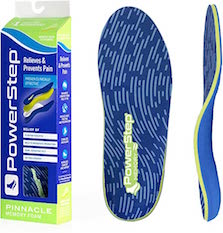
Powerstep Arch Supports Insoles with Memory Foam

Experience walking on a cloud. Get arch support with memory foam to cradle your heels and toes.


Powerstep Men’s Arch Support Orthotic Flip Flop Sandals

At the beach or the bazaar keep every step balanced and pain free. Neutral arch support Men’s sandals.


Powerstep Women’s Slenderfit Fashion Neutral Arch Support

Feminine designed SlenderFit neutral arch supports are designed specifically for thin women’s shoes like flats or mary jane’s.


Powerstep Low Profile Running Shoe Neutral Arch Support

Ultra thin design and extra shock-absorbing padding for runners. Available in 3/4 and full length supports.


PowerStep Women’s Arch Support Thongs

Unmatched arch support from a sidewalk and sand thong sandal. Deep heel cradle; available in 5 colors.

Looking for “Orthotics Near Me” and haven’t tried PowerStep brand arch support inserts? You owe it to yourself to give them a try!

Shoes Without Arch Support

Good posture starts at your feet and goes up. Shoes without arch support cause knee and low back pain. Generally low quality shoes with have little to no arch support. Additionally, an unsupported foot arch will transfer posture distortion all the way to your neck. As a matter of fact sandals are the notorious for having no arch support. If you choose to wear sandals I recommend Keen or Teva because they have better arch support than other brands. When you wear shoes you should use orthotic inserts. You don’t need to spend a fortune on custom made orthotics. Universal orthotics such as PowerStep are very affordable and will make an incredible difference in your posture.


PowerStep Brand Inserts Are The Best On The Market.

My Personal Review Of PowerStep Insoles

Finally my personal review of PowerStep Insoles. After well over 14 years of daily use I can say that PowerStep Insoles are incredibly durable. I have used PowerStep arch support shoe inserts while running, hiking, working on cars, doing construction projects, attending weddings and dancing all night. They truly have been a lifesaver for my knee and low back pain. PowerStep now offers Sandals which is something I have been waiting for. Keen brand sandals have worked really well for me over the years. Keen’s have a similar arch support to PowerStep Insoles and are also durable, American Made, quality. If you have a desire to stop low back pain and knee pain PowerStep Insoles are the best way to correct your posture from the ground up.